STL (from "stereolithography", and sometimes read as "standard triangle language") dates from 1987 and is still the default way to share models for 3D printing. Nearly every CAD program can export it and every slicer can read it. Its secret is simplicity: an STL file describes the surface of an object as a collection of flat triangles, and nothing else.
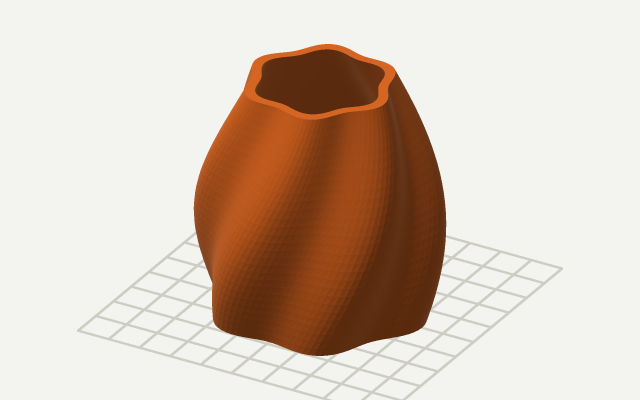
What is inside an STL
Each triangle — called a facet — is stored as three corner points (vertices) and a normal vector that points out of the solid. There are no curves, so a cylinder becomes a ring of thin rectangles split into triangles, and a sphere becomes a faceted ball. There is also no color, material, texture or unit information in a standard STL.
STL comes in two encodings that carry exactly the same information.
Binary STL
| Bytes | Content |
|---|---|
| 80 | Header (free text, usually the exporting program) |
| 4 | Number of triangles (unsigned 32-bit integer) |
| 50 per triangle | Normal (3 floats), three vertices (9 floats), 2-byte attribute |
Every triangle takes exactly 50 bytes, so a binary STL's size is 84 + 50 × triangles. A 100,000-triangle model is almost exactly 5 MB.
ASCII STL
The text version spells out each facet:
solid name / facet normal 0 0 1 / outer loop / vertex 0 0 10 / vertex 10 0 10 / vertex 10 10 10 / endloop / endfacet / … / endsolid name
ASCII files are human-readable but four to five times larger, so most programs export binary by default.
The "solid" trap
By convention an ASCII file starts with the word solid. Unfortunately many binary exporters also start their 80-byte header with "solid", so a reader that only checks the first word misreads them as text and finds nothing. A robust reader — like the one in our STL viewer — first checks whether the file size matches 84 + 50 × the triangle count, which identifies binary files reliably.
STL has no units
An STL stores plain numbers. Whether 10 means 10 millimetres, 10 inches or 10 metres is up to the software that reads it. 3D printing software assumes millimetres, which works for most files. Problems appear with models exported from programs that work in other units — a Blender scene in metres produces a part 1,000 times too small, and an imperial CAD model can come out 25.4 times too small.
If a model looks like a speck or is far too big for the bed, it is almost always a units problem. In our calculator, change "File units" and the dimensions, volume and cost update instantly.
Triangles and resolution
Because STL can only store flat triangles, curved surfaces are approximated. More triangles give smoother curves and more accurate volumes but larger files. When exporting from CAD you usually choose a chord tolerance or angle; a tolerance of 0.01–0.05 mm is plenty for FDM printing.
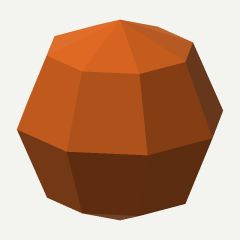 48 triangles · 23.2% low
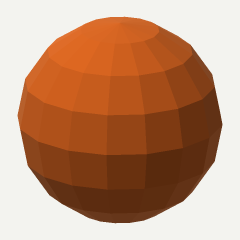 224 triangles · 6.3% low
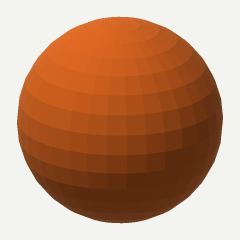 960 triangles · 1.6% low
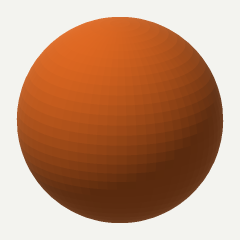 3,968 triangles · 0.4% low
The figure above shows how coarse meshes lose volume: a 48-triangle sphere has 23% less volume than the real sphere, while a 3,968-triangle version is within 0.4%. Beyond a few thousand triangles for a simple shape, the extra detail is smaller than a printed line width.
Watertight and manifold meshes
For a slicer to know what is inside and what is outside, the triangles must form a closed surface — a watertight mesh. Technically, every edge must be shared by exactly two triangles, and those two triangles must run along the edge in opposite directions. Common faults are:
- Open edges (holes) — an edge used by only one triangle, often from a missing face or a gap between parts.
- Non-manifold edges — an edge shared by three or more triangles, for example two cubes touching along an edge.
- Flipped faces — triangles whose normal points inward. Our viewer shows the inside of the model in red, so flipped faces and holes stand out.
- Multiple shells — several separate closed parts in one file. That is fine for printing, but intersecting shells can confuse volume calculations.
The calculator counts open, non-manifold and flipped edges for every file you load. Most slicers can repair small problems automatically; for larger ones use your CAD program or a mesh repair tool before printing.
How volume is calculated from triangles
For a closed mesh, volume can be computed exactly with the divergence theorem. Each triangle forms a tetrahedron with the origin; the signed volume of that tetrahedron is one sixth of the dot product of one vertex with the cross product of the other two:
V = Σ a · (b × c) ÷ 6
Triangles facing away from the origin add volume and those facing toward it subtract, so everything outside the model cancels out. If the sum is negative, the normals point inward. This only works for watertight meshes: with a hole, the cancellation fails and the volume is meaningless — which is why the calculator checks topology first.
STL vs 3MF and OBJ
3MF is a newer format that stores units, colors, multiple objects, print settings and even supports in a compressed package. Slicers such as Bambu Studio and PrusaSlicer save projects as 3MF. OBJ stores triangles plus optional textures and is common in 3D graphics. STL remains the universal exchange format for single-color parts, and it is what most model sites offer for download.
Need to look at a file on a phone or a PC without 3D Viewer? See how to open STL files on any device.