In cross stitch, confetti means isolated stitches of one color scattered among other colors — like confetti sprinkled across the chart. A single stitch of a color with no neighbours of the same color is the purest form; small clusters of two or three are often counted too.
Why confetti is a problem
- It's slow. Each isolated stitch means threading a needle, securing the start, making one X and securing the end.
- It wastes floss. Starts and finishes use a few centimetres each — on a confetti-heavy chart this can add 30–50% to your floss usage.
- It makes the back messy. Long jumps between stitches create lumps and can show through light fabric.
- It's hard to keep track of. Hunting for single symbols on a busy chart is tiring.
Some stitchers love confetti — it creates beautifully realistic, painterly results — but most prefer patterns with calm areas of color.
Why photo patterns have so much confetti
Photos are full of subtle noise: grain, texture, slight color shifts. When a converter reduces a photo to a limited palette, pixels near the boundary between two colors flip randomly from one to the other. Dithering — mixing colors to simulate in-between shades — creates even more, deliberately.
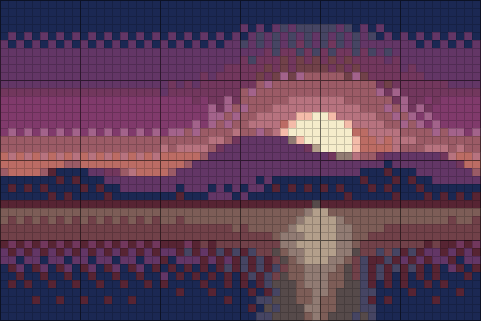 Off
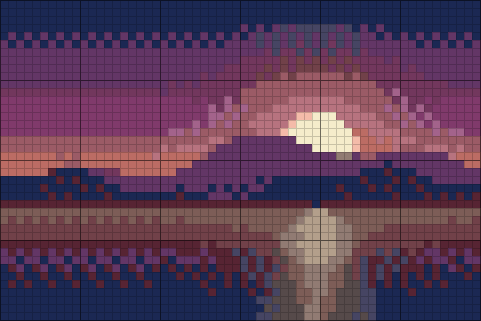 Light
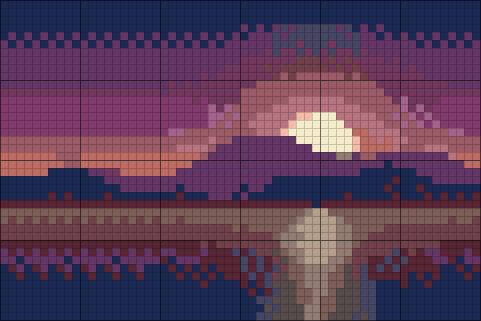 Strong
How FlossChart removes confetti
After matching colors, FlossChart looks at each stitch and its eight neighbours:
- Light: if a stitch has no neighbours of the same color, it's replaced with the most common neighbouring color (ties go to the closest color). True singles disappear, edges stay sharp.
- Strong: repeats the process and also replaces stitches with only one matching neighbour when they're surrounded by a single other color. This smooths fur, foliage and skies.
Because it replaces a stitch only with a color that's already around it, the overall picture barely changes — but the chart becomes far more pleasant to stitch.
Does cleanup lose detail?
Very little. Because a stitch is only ever replaced with a color that already surrounds it, outlines, eyes and other features that span several stitches are left alone. What disappears is speckle: stray stitches that the eye blends away at normal viewing distance anyway. Use the Compare button to hold up the original, and switch between Off, Light and Strong to judge the difference on your own photo.
Other ways to reduce confetti
- Use fewer colors. Fewer colors means fewer boundaries where noise can flip.
- Turn dithering off. Keep it at 0–20% for cross stitch.
- Simplify the photo first. A slight blur or "noise reduction" in a photo editor smooths texture before conversion.
- Increase contrast. Clear tonal steps produce clear color areas.
- Leave the background unstitched. A noisy background is often the biggest confetti source.
How to stitch confetti efficiently
If you love the realistic look, these techniques help:
- Parking: work a small block (for example 10 × 10) at a time, and "park" each thread on the front of the fabric where it's next needed instead of ending it.
- Cross country: stitch all stitches of one color in an area before moving on, carrying the thread on the back for short distances (no more than 3–4 stitches).
- Pre-threaded needles: keep several needles threaded with the colors in the current block.
- Loop start: for even-numbered strands, fold one long strand and use the loop to anchor without a knot.
How much confetti is acceptable?
There's no fixed rule, but a useful measure is the share of stitches that are isolated singles. Under about 1% feels clean to most stitchers; 1–5% is "some confetti" and suits experienced stitchers; above 5% is a full confetti pattern that will take noticeably longer. FlossChart's light setting removes every true single, so the remaining texture comes from small clusters, which are much quicker to stitch than scattered individual Xs.
Confetti and pattern-keeping apps
Digital pattern-keepers such as Pattern Keeper or Markup R-XP let you highlight stitches as you go and filter by a single color, which makes confetti-heavy charts far easier to follow. Print your FlossChart pattern to PDF and open it in one of these apps: symbols are drawn crisply so they can be recognised, and the coordinates on every page help you find your place.
When to keep confetti
Pixel art, intentionally textured designs and small accents (like the highlight in an eye) are "good" confetti — stitches you want. That's why FlossChart's pixel art converter turns cleanup off. If an important highlight disappears in a photo pattern, simply add it back by hand when stitching.