If you have ever dithered an image, you have almost certainly used Floyd–Steinberg — it is the default in most graphics software. Atkinson is the other famous name, beloved for the classic early-Macintosh look. Both are error-diffusion algorithms, but they make very different trade-offs.
At a glance
| Floyd–Steinberg | Atkinson | |
|---|---|---|
| Created | 1976, Robert Floyd & Louis Steinberg | 1984, Bill Atkinson (Apple) |
| Neighbours receiving error | 4 | 6 |
| Error diffused | 100% | 75% |
| Tonal accuracy | High | Lower — clips highlights and shadows |
| Look | Detailed, neutral, slightly noisy | Crisp, high-contrast, airy |
| Typical artifacts | "Worm" patterns in midtones | Blown-out highlights, lost shadow detail |
| Best for | Photos, gradients, general use | Low-res screens, portraits, illustrations |
How Floyd–Steinberg works
For each pixel, Floyd–Steinberg chooses the nearest palette color and calculates the error. It then distributes all of that error to four neighbours: 7/16 to the right, and 3/16, 5/16 and 1/16 to the three pixels below.
      *   7
  3   5   1      (÷16)
Because the full error is preserved, the average brightness of every region matches the original very closely. That is why Floyd–Steinberg reproduces smooth gradients and subtle mid-tones so well.
How Atkinson works
Atkinson spreads error to six neighbours — two to the right, three below and one two rows down — each receiving 1/8. That adds up to only 6/8, so a quarter of the error is thrown away.
      *   1   1
  1   1   1
      1          (÷8)
Discarding error has a distinctive effect. In near-white areas, small amounts of "darkness" never accumulate enough to produce a black dot, so highlights stay perfectly clean. The same happens in near-black areas. The result is crisper and more contrasty, at the cost of tonal accuracy at the extremes.
Side-by-side comparison
 Floyd–Steinberg
 Atkinson
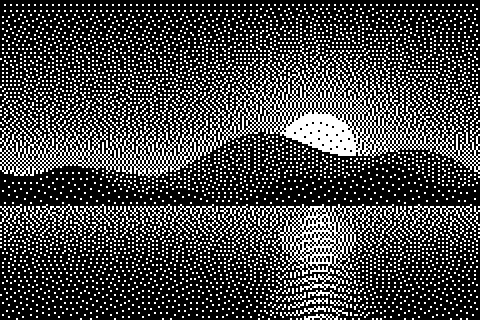
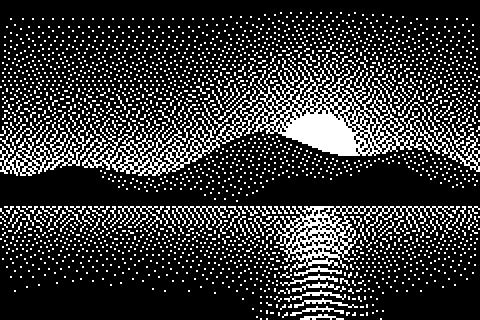
In the landscape above, look at the sky near the sun. Floyd–Steinberg renders a smooth glow with scattered dots. Atkinson renders large areas of clean white and a cleaner silhouette, but the subtle glow is partly lost.
 Floyd–Steinberg
 Atkinson
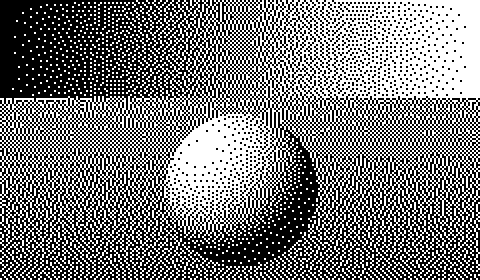
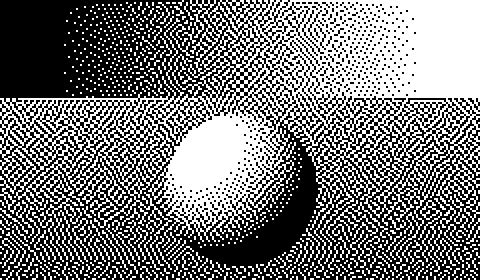
The gradient makes the trade-off obvious. Floyd–Steinberg spreads dots across the entire range. Atkinson turns a noticeable stretch at the bright end of the ramp into pure white and the dark end into pure black — but the middle of the ramp tends to look cleaner, with fewer worm-like artifacts.
With more colors
The more colors your palette has, the less the difference matters, because each color step is smaller and there is less error to diffuse.
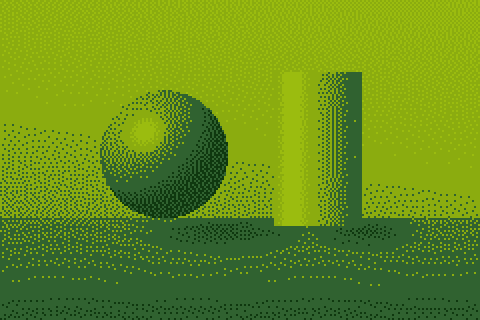 Floyd–Steinberg
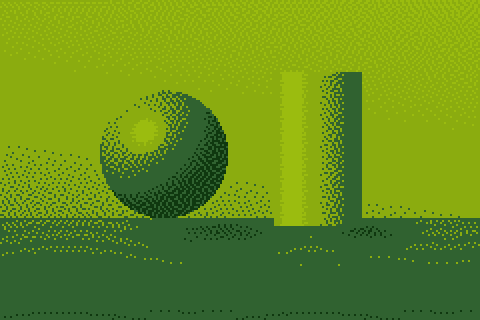 Atkinson
Artifacts to watch for
Floyd–Steinberg "worms"
Because Floyd–Steinberg only pushes error to the right and downward, flat mid-tone areas sometimes develop short, wriggling chains of dots that run diagonally — often called worms. They are most visible in large, even regions such as a clear sky or a studio backdrop at around 25% or 75% gray. Two easy fixes: enable serpentine scanning, which alternates the processing direction on every row and breaks up the chains, or add a tiny amount of noise to the source image before dithering.
Atkinson clipping
Atkinson's characteristic artifact is the opposite: detail disappears at the extremes. Subtle texture in white clothing, clouds or light skin can vanish entirely, and dark hair can become a solid black shape. If that happens, reduce contrast slightly or lower brightness a few steps before dithering so that important tones sit further from pure white and black.
Edge effects
Both algorithms process the image from the top-left corner, so the first row and column receive no incoming error. On some images this produces a slightly different texture along the top and left edges. It is rarely noticeable in practice, but if you need a perfect border, add a few pixels of padding before dithering and crop them off afterwards.
Speed and implementation
Both algorithms are fast enough to run in real time on modern hardware — the DitherImage tool processes a typical photo in a few dozen milliseconds in the browser. Floyd–Steinberg touches four neighbours per pixel and Atkinson six, so Atkinson does about 50% more work, but on today's machines the difference is negligible. On microcontrollers, Atkinson has one practical advantage: its weights are all 1/8, so the division can be done with a single bit shift.
Neither algorithm can be parallelised easily, because each pixel depends on the error from the pixels processed before it. If you need to dither video frames on a GPU, ordered dithering is usually the better fit.
When to choose Floyd–Steinberg
- Photographs with important detail in highlights and shadows.
- Smooth gradients such as skies and studio backdrops.
- Higher-resolution output, such as print.
- When you want the most faithful reproduction of the original.
When to choose Atkinson
- Small, low-resolution screens such as e-ink displays and tiny OLEDs, where clean highlights matter more than tonal accuracy.
- Thermal printers, where dot gain would otherwise darken the image.
- Portraits and illustrations where you want a crisp, graphic look.
- The nostalgic MacPaint / early-Mac aesthetic.
What about Stucki, Jarvis and Bayer?
Floyd–Steinberg and Atkinson are not the only options:
- Stucki and Jarvis–Judice–Ninke diffuse error to twelve neighbours. They give the smoothest results and fewest worm artifacts — often the best choice for large photographic prints and laser engraving.
- Bayer ordered dithering uses a fixed pattern instead of diffusing error. It looks deliberately retro and is the best choice for animation.
See all of them side by side in our dithering gallery.
Verdict
There is no universal winner. Floyd–Steinberg is the better default because it is faithful and works on almost anything. Atkinson is the better stylistic choice for crisp, high-contrast images and small screens. The fastest way to decide is to try both on your own image — switch between them instantly in the dithering tool.